verified Attendance-linked & compliance-ready payroll

Payroll Software That Understands PF, ESI, and Shift Pay

Run payroll for your office, factory or workshop the way it actually works — attendance-linked, statutory-compliant, and ready in a fraction of the time it takes on spreadsheets.

check_circleNo credit card requiredschedule30-minute walkthrough
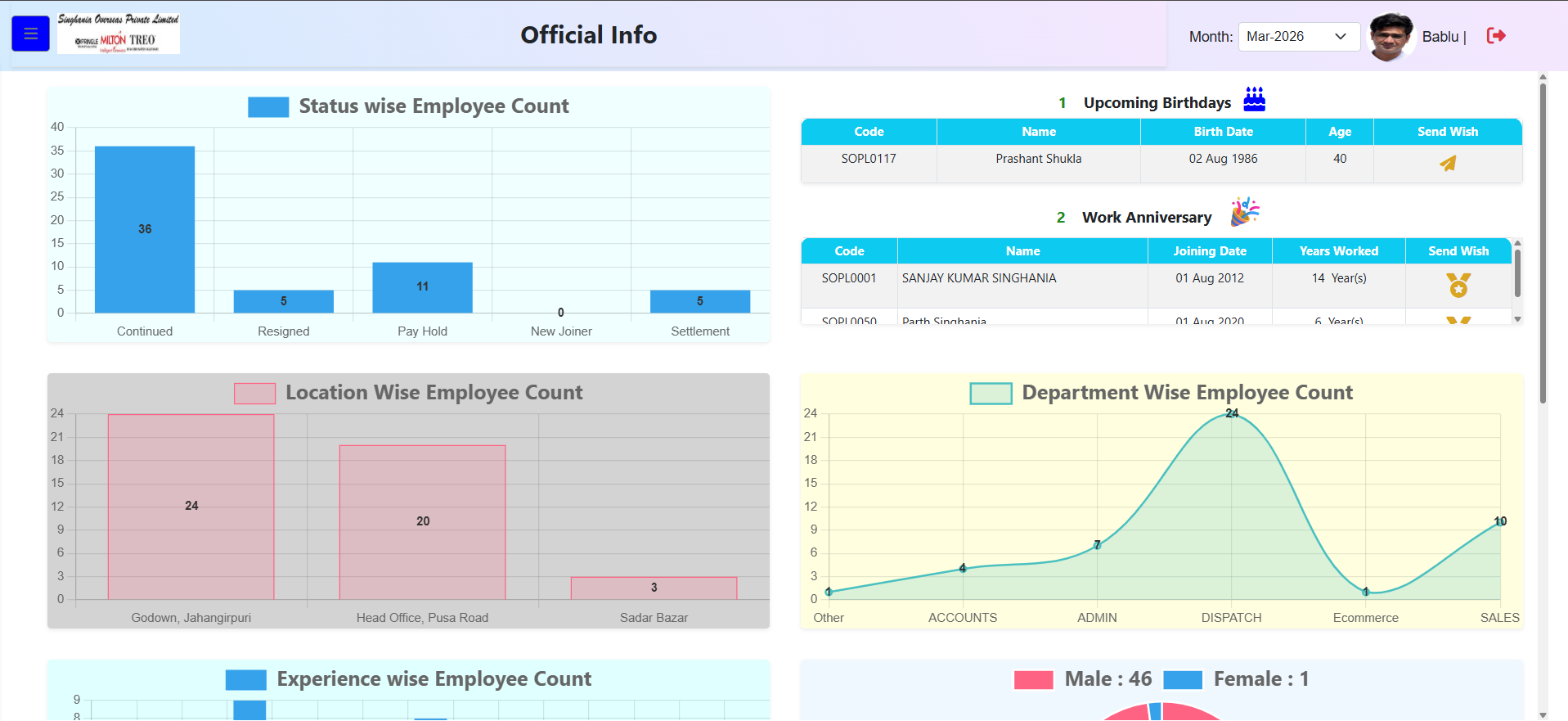
PayOneHR dashboard showing employee counts, birthdays and workforce analytics
monitoring Live workforce dashboard
The spreadsheet problem

Payroll shouldn't be the hardest three days of your month

If your team is still doing this every cycle, you already know the cost.

sync_problem

Pulling attendance from a register or biometric export and retyping it into a payroll sheet.

folder_off

Chasing PAN, Aadhar, UAN, and ESIC numbers for new joiners across multiple forms.

calculate

Recalculating PF, ESI, and Professional Tax by hand every time a rate or slab changes.

edit_calendar

Applying LOP days, arrears, and salary revisions before every run.

description

Producing a report for the auditor or owner at the last minute, from three different files.

None of this is a payroll problem — it's a data-in-one-place problem. That's what PayOneHR fixes.

What PayOneHR's payroll engine actually does

One connected workflow from employee data to payroll

upload_file
One-time import, not repeated data entry

Bring in new joiner details, salary structure, statutory IDs (PAN, Aadhar, UAN, ESIC), and bank details in one guided import.

fingerprint
Attendance flows straight into pay

Biometric, manual punch, or uploaded attendance feeds directly into payroll so LOP, overtime, and working days are calculated automatically.

account_balance
PF, ESI & PT calculated automatically

Statutory contributions are calculated against the applicable PF, ESI, and state-wise Professional Tax rules each cycle.

currency_rupee
Mid-cycle changes, handled cleanly

Apply salary revisions, arrears, extra-day working, and other earnings within the same cycle without breaking the payroll run.

dashboard
A live view of your workforce

Track headcount by location and department, joiner and resignation trends, and workforce composition from a live dashboard.

download
Reports ready when you need them

Export payroll, attendance, and statutory reports without rebuilding them from scratch every month.

Product screens

See PayOneHR in action

A look at the dashboards and workflows used for employee records, attendance and bulk data operations.

Dashboard screen
Dashboard

Status-wise, location-wise, department-wise and experience-wise employee views, plus upcoming birthdays and work anniversaries.

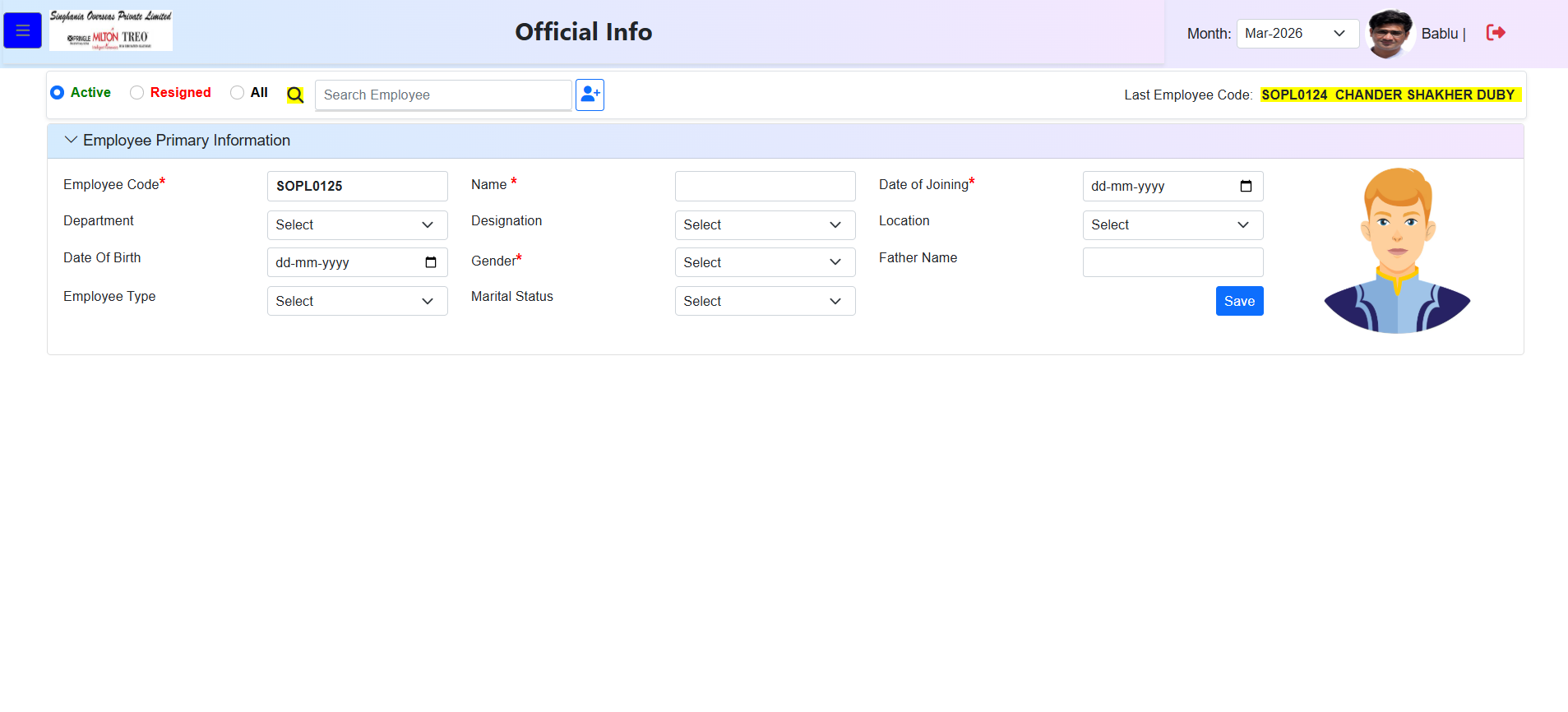
Employee primary information screen
Employee Primary Info

Maintain core employee details such as code, name, joining date, department, designation, location and status.

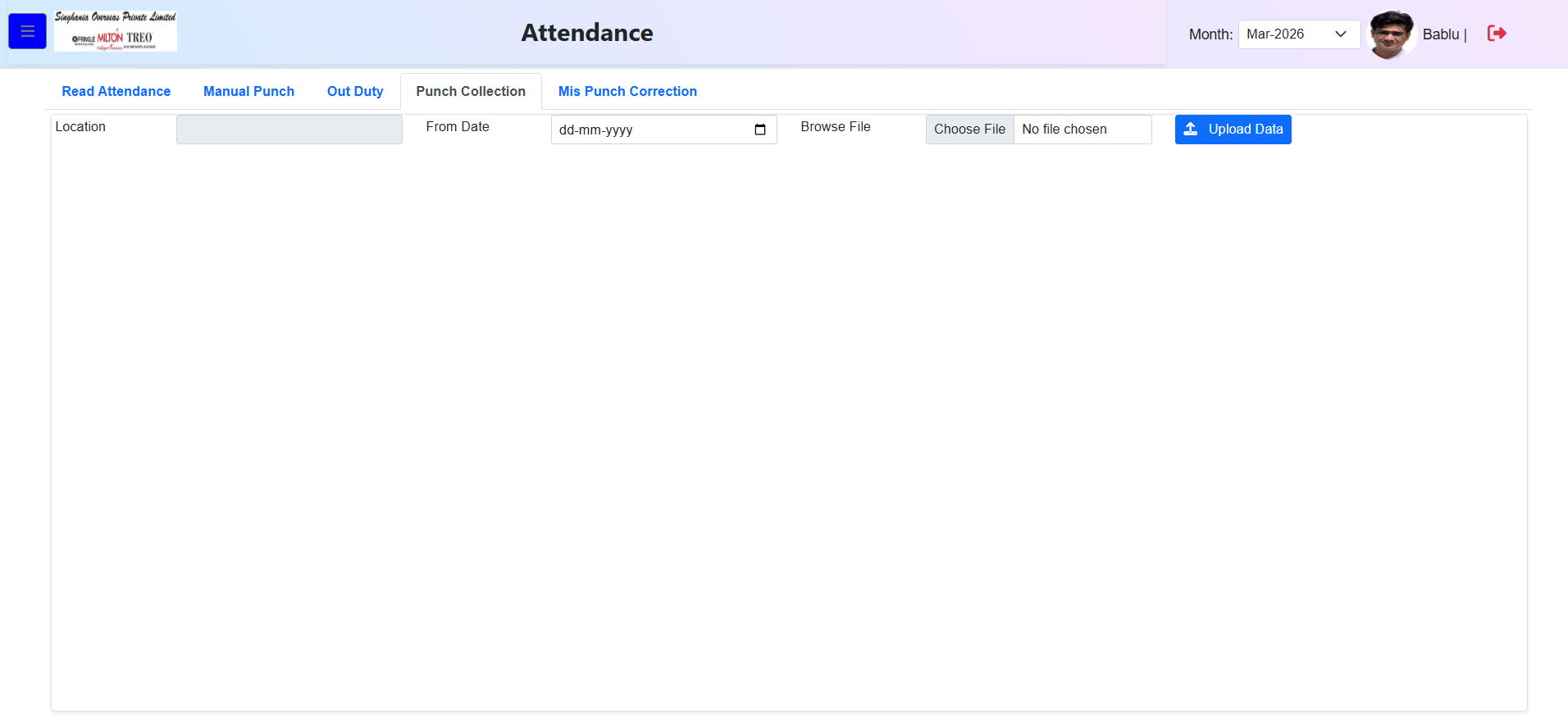
Auto upload attendance screen
Auto Upload Attendance

Upload attendance files into the attendance workflow and keep punch data connected with payroll processing.

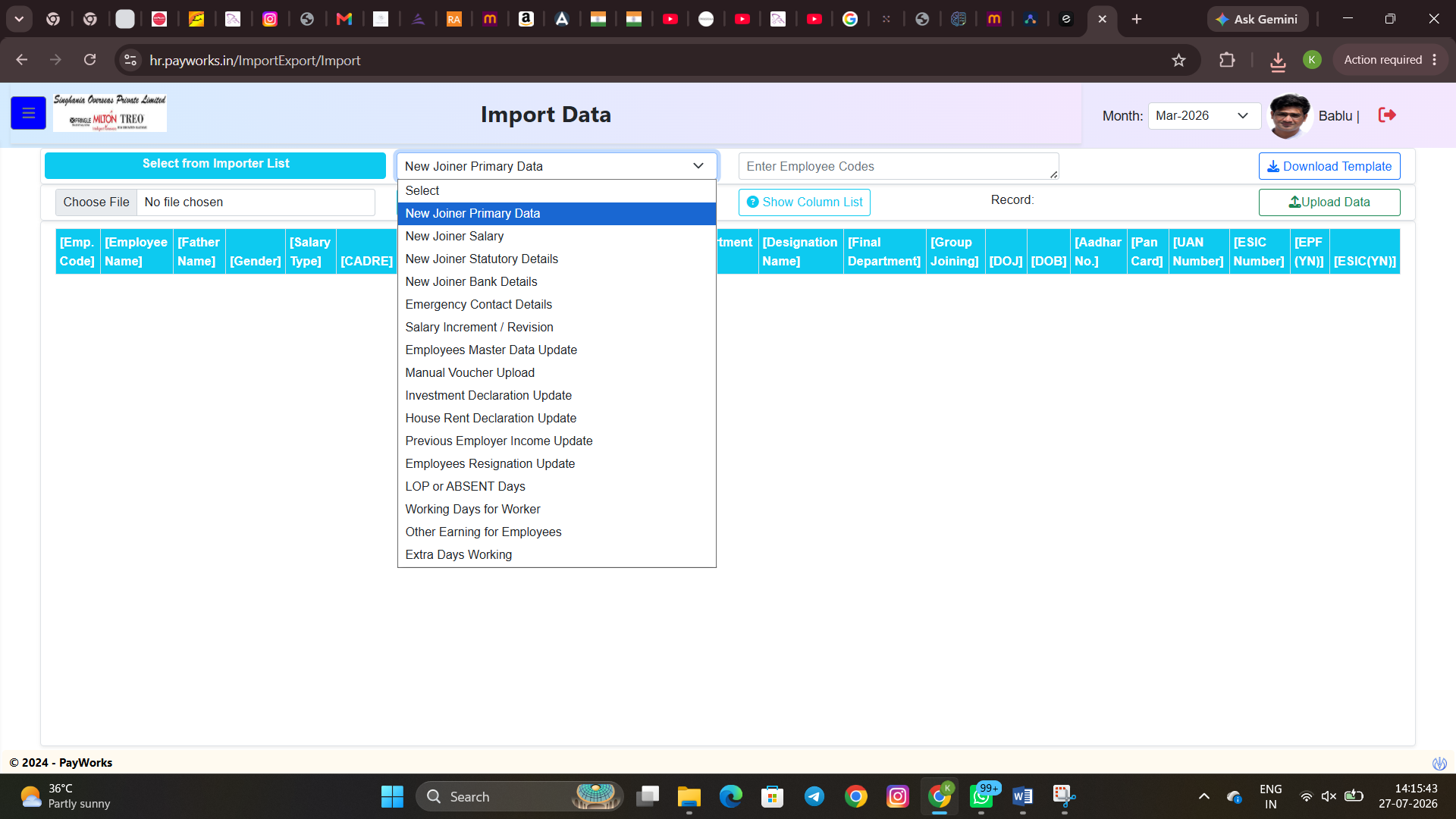
Bulk import and export data screen
Bulk Upload & Export

Use templates for employee, salary, joining, resignation and other master data, with bulk upload and export support.

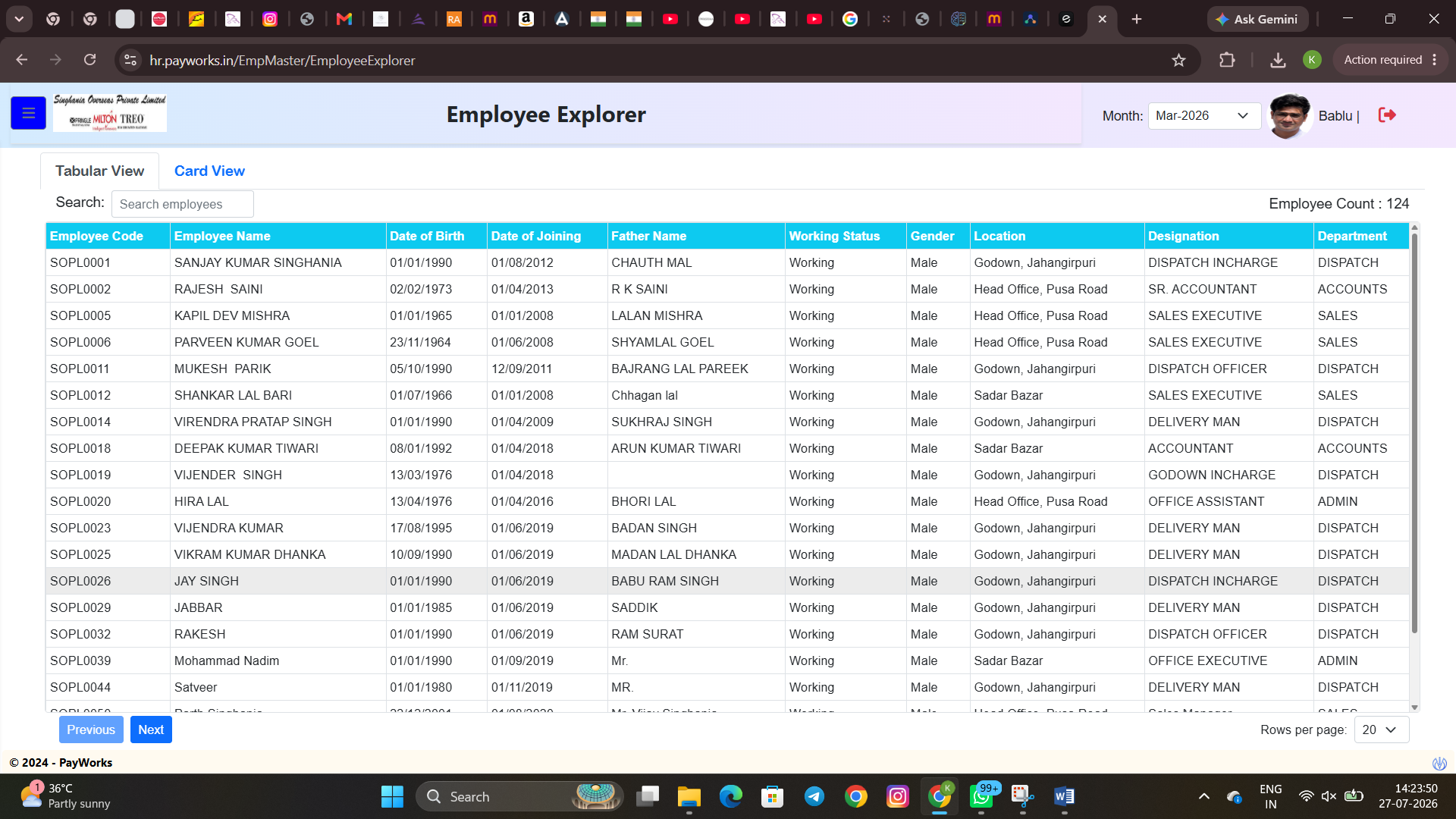
Employee Explorer screen
Employee database
Employee Explorer

Search and review employee records in tabular or card view with fields for department, designation, location, working status and more.

Every office HR workflow, one connected system

Keep attendance, compliance and pay in sync

One record per worker — permanent or contract — so shop-floor and office data don't have to live in separate files.

badge
Employee database

Documents, department, location and shift history in a single worker profile.

payments
Payroll & compliance

Attendance-linked payroll with PF, ESI and Professional Tax, plus salary revisions and LOP.

event_available
Attendance & shifts

Biometric, manual or file-based attendance across day/night shifts and multiple locations.

groups
Hiring & onboarding

Capture statutory IDs, salary structure and bank details once at joining, individually or in bulk.

trending_up
Performance reviews

Set goals, run reviews, and track growth plans across your workforce without spreadsheets.

bar_chart
Workforce analytics

Headcount, location/department trends and workforce composition that update as your team changes.

How it works

Live on the shop floor in three steps, not three months

01
Import your workforce

Bring in employee and contractor records, including salary structure, statutory IDs and bank details, from registers, spreadsheets or your current HR tool.

02
Set your shift and pay rules

Configure shift patterns, overtime and piece-rate rules, leave policies, and state-specific PF/ESI/PT requirements to match your operation.

03
Invite your people

Supervisors and workers get self-service access to attendance, leave and payslips from day one, including staff using phones on the shop floor.

6,400+
Companies onboarded
1.2M
Employee records managed
38%
Avg. reduction in HR admin time
99.95%
Payroll run reliability
Pricing

Pricing that scales with your team, not against it

Pricing is based on your team size and the modules you actually need — from a single-location workshop to a multi-shift, multi-site operation.

Core HR

For teams getting off spreadsheets

  • Employee database (permanent staff)
  • Attendance tracking (manual & biometric)
  • Self-service leave requests
  • Basic workforce reports
Get a Quote

Enterprise

For multi-location or multi-shift operations

  • Everything in Growth
  • Multi-location & multi-shift management
  • Contract labour tracking at scale
  • Performance reviews & goal tracking
  • Live workforce analytics dashboards
  • Priority support & dedicated onboarding
Get a Quote
What decides your price: team size, modules needed, locations & shifts, and the level of support/onboarding required.
Frequently asked questions

Common payroll & pricing questions

Need an exact answer for your setup? Send your team size and shift structure through the contact form.

Contact us

Yes. New joiner details, salary structure, statutory IDs and bank information can be brought in through a guided spreadsheet import.

Yes. Statutory contributions are calculated as part of the payroll cycle so rate or slab changes don't require rebuilding manual formulas.

Attendance can come from biometric exports, manual punch entry or a direct file upload. The same attendance data then feeds payroll calculations for working days and LOP.

Yes. Salary revisions, arrears and extra earnings can be applied within the same payroll cycle without disrupting the rest of the run.

Yes. The same payroll engine can support a single workshop or multi-site operations with location-wise and department-wise reporting.

Team size, shift structure, locations and modules can vary significantly. PayOneHR pricing is quoted around your actual setup rather than using one generic per-seat number.

Yes. You can begin with the modules you need now and add payroll, compliance or analytics later without switching systems.
See your payroll run on your own data

Tell us about your team size and how you currently run payroll.

We'll follow up with a demo built around your actual process.

Book a Free Demo